
Creditor listing - Credit Control Listing (Reports menu)
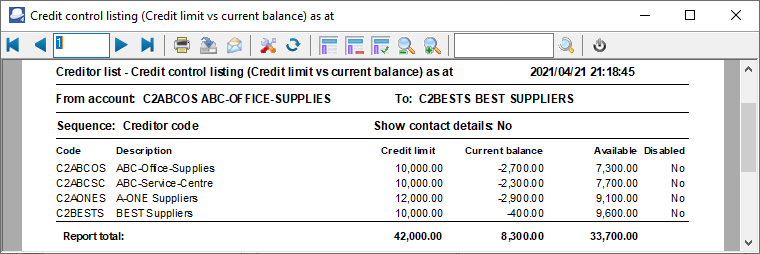
The Creditor listing - Credit control listing (Credit limit vs Current balance) as at... report will list the Account code, Name of the Creditor (account description), Postal address, Telephone 1 / 2, Credit limit, Current balance and the Available balance as at the date and time of printing this report.
To print Creditor listing - Credit control listing (Credit limit vs Current balance) as at... report:s
1.Select the Reports → Creditors → Listing menu.
2.Select "Credit control listing (Credit limit vs Current balance) as at", if not already selected.
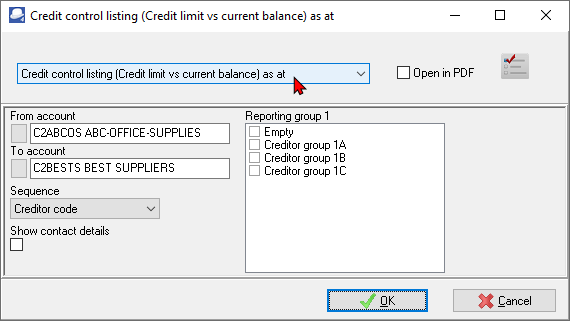
3.Select the following:
a)From account... To...account - Select a creditor (supplier / vendor) account or a range of creditor (supplier / vendor) accounts, to include in the report.
b)Sequence - Select "Creditor code, Description, Credit limit or Disabled" to print the report details in the order (sort) in which you wish to display the data.
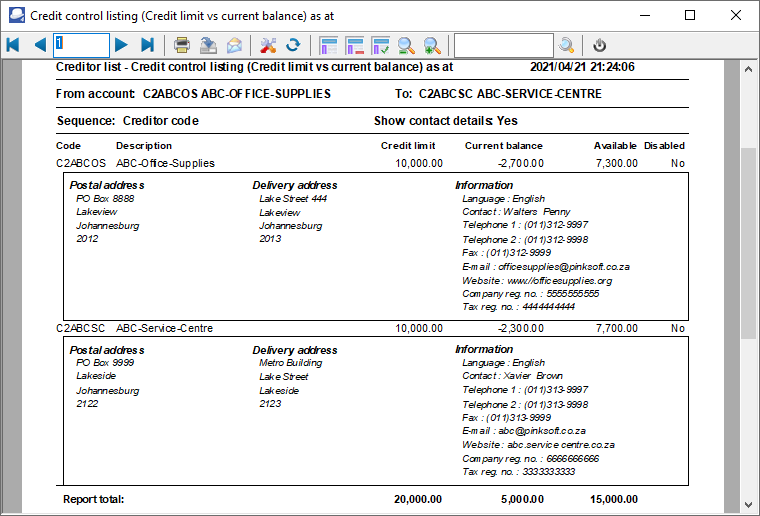
c)Show contact details - You may select this option to view the postal address, delivery address, telephone numbers, Fax number, email address, website and more for each creditor account.
d)Reporting group 1 - Select a reporting group or more reporting groups. The report will only be printed for those creditor (supplier / vendor) accounts linked to the selected Creditor reporting group 1.
4.Click on the OK button.
View the "Creditor listing - Credit control listing (Credit limit vs current balance) as at..." report
|
|
Negative amounts in the Available column, not prefixed with a minus sign (-), indicates that the creditor (supplier / vendor) account(s) are exceeding the credit limit. This means that the •Credit limit is not entered, or may need to be increased on the Accounting information tab - Edit → Creditors. •The creditor (supplier / vendor) account(s) are in overdue. You may need to pay these creditors (suppliers / vendors), etc. before making any further purchases from these creditors (suppliers / vendors). |

View the "Creditor listing - Credit control listing (Credit limit vs current balance) as at..." (Contact details) report.
|
|
The Contact: name of the contact person will only be displayed, if the contact is selected on the "Contactperson" field of the creditor (supplier / vendor) account. |