
Delete Set of Books
You may wish to delete (remove) a Set of Books permanently from your system. You must be absolutely sure you want to delete a Set of Books, as the data will be permanently lost. Before you delete a Set of Books from your system, please make sure that all the necessary reports are printed and retained together with the necessary supporting documents, such as slips, cheques, invoices, etc. to substantiate your profit (or loss) from the business, which you have previously submitted on your Tax returns.
|
|
This operation can not be reversed! If you have deleted a Set of Books by mistake, you need to restore it from a backup file! |

|
|
You must remember, even if you are a small business, you need to keep the necessary records for five years commencing from the date of the date of receipt of the last applicable Tax return for audit and record purposes. If other statutory prescriptions are applicable to your business, you should also comply with them. |
|
|
Once you are absolutely sure, you may then delete a Set of Books. |

To delete a Set of Books:
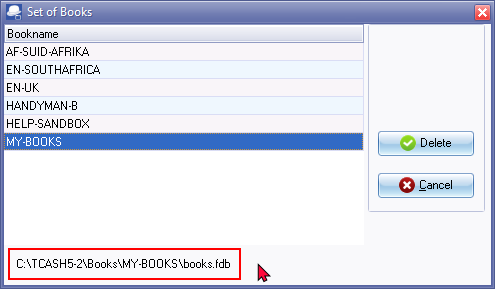
- On the Start ribbon, select Delete Set of Books. The following Set of Books screen, reflecting the list of all Set of Books, is displayed:
|
|
The location or full path of the selected Set of Books is displayed. Before you click the Delete button, make absolutely sure that the correct Set of Books is selected. |
|
|
Red - Font colour This indicates that a Set of Books (elsewhere on your system) is deleted or the Set of Books folder is moved somewhere else on your system. It may also indicate that the drive or network on which the Set of Books is stored, is not available or mounted. Blue - Font colour This indicates that a Set of Books is not located in the directory where TurboCASH5.2 is installed, but elsewhere on your system. |

- Select the Set of Books, and click on the Delete button. The following confirmation message is displayed:
Are you sure you want to delete the MY-BOOKS set of accounts?"
- If you are sure, click on the Yes button. Another confirmation message is displayed:
The Set of Books MY-BOOKS will permanently be removed from disk!
Do you want to cancel the deletion?
- On this screen you have the option to cancel the deletion process. If you click on the Yes button, the process will be terminated. If you click on the No button, the Set of Books will be permanently deleted.
- Wait for the deletion process to finish. The following information message is displayed:
Set of Books D:\TCASH5-2\books\MY-BOOKS\books.fdb deleted!
- Click on the OK button.
|
|
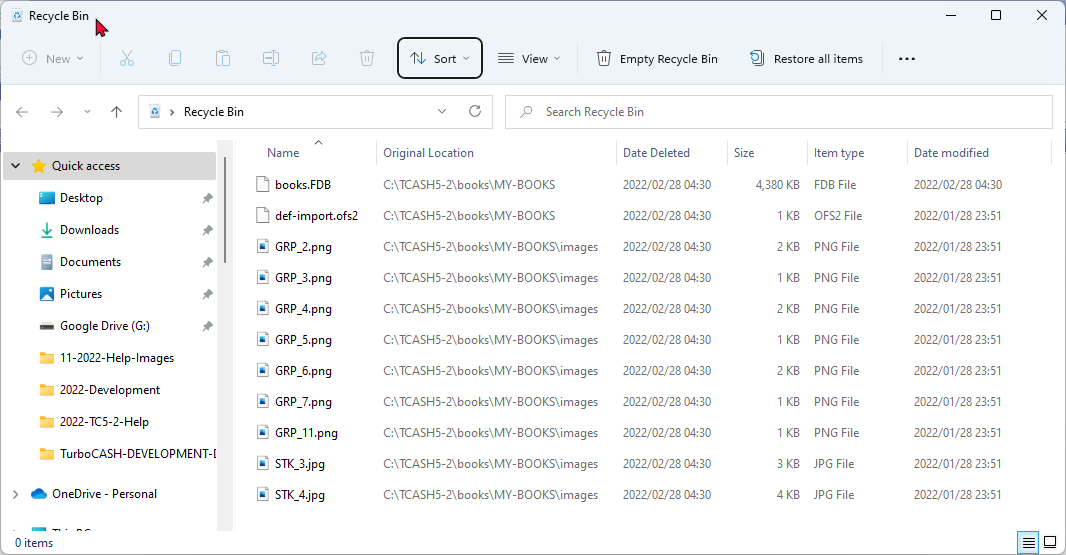
Once the Set of Books is deleted, the contents of the folder with the name of the Set of Books maybe emptied and the files for the Set of Books will be transferred to the Recycle Bin of your Operating System.
You may need to: -
|

|
|
If the Set of Books is not too large for your Recycle Bin, all the files for the deleted Set of Books will be transferred to your Recycle Bin. You then need to click on the Recycle Bin icon on your desktop and empty the Recycle Bin to make more space available on your hard disk. |
|
|
Should you have any Set of Books open on the system whilst deleting a Set of Books, TurboCASH5.2 will automatically close any Set of Books on your system at this stage. |