
Supplier returns per period (Reports menu)
The following five (5) reports are available to analyse supplier return documents:
1.Supplier returns per period - Creditor group 1 - List the Supplier returns by creditor (supplier / vendor) reporting group 1 linked to creditor (supplier / vendor) accounts on the Edit → Creditors menu.
2.Supplier returns per period - Creditor group 2 - List the Supplier returns by creditor (supplier / vendor) reporting group 2 linked to creditor (supplier / vendor) accounts on the Edit → Creditors menu.
3.Supplier returns per period - Document group 1 - List the Supplier returns by document reporting group 1 linked to the Supplier return.
4.Supplier returns per period - Document group 2 - List the Supplier returns by document reporting group 2 linked to the Supplier return.
5.Supplier returns per period - Salesperson - List the Supplier returns by salesperson (person who processed the Supplier return document).
|
|
This report only includes Supplier return documents which are posted. Unposted Supplier return documents will be NOT be included in this report. |

To print Supplier returns by Reporting groups reports:
1.Select the Reports → Purchase analysis → Supplier returns per period menu.
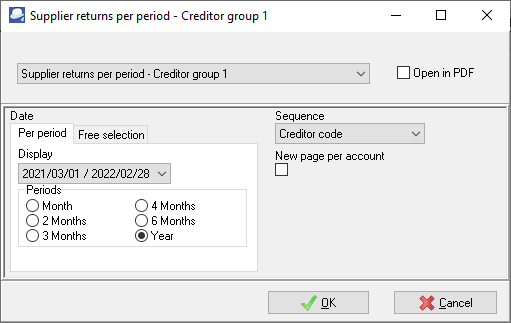
2.Select the following:
a)Report - Select the Supplier returns per period - Creditor group 1 (default), Supplier returns per period - Creditor group 2, Supplier returns per period - Document group 1, Supplier returns per period - Document group 2 or Supplier returns per period - Salesperson report.
b)Period - Select the period on the Per period tab. You may click on the Free selection tab to select a specific date or a range of dates.
c)Sequence - Select "Creditor code" to print the report by account code or "Description" to print the report by account description (name).
d)New page per account - If this option is selected (ticked), it will print the transactions for each account on a new page.
|
|
The Company details will not be printed as in the Page header. The company name is displayed in the Page footer. |

3.Click on the OK button.
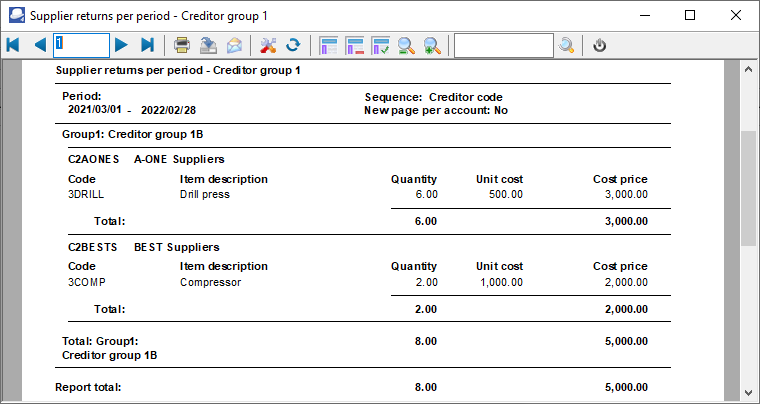
An example of the "Supplier returns per period - Creditor group 1" report, is as follows:
|
|
If this report contains more than one reporting group, each Reporting group will start on a new page. |