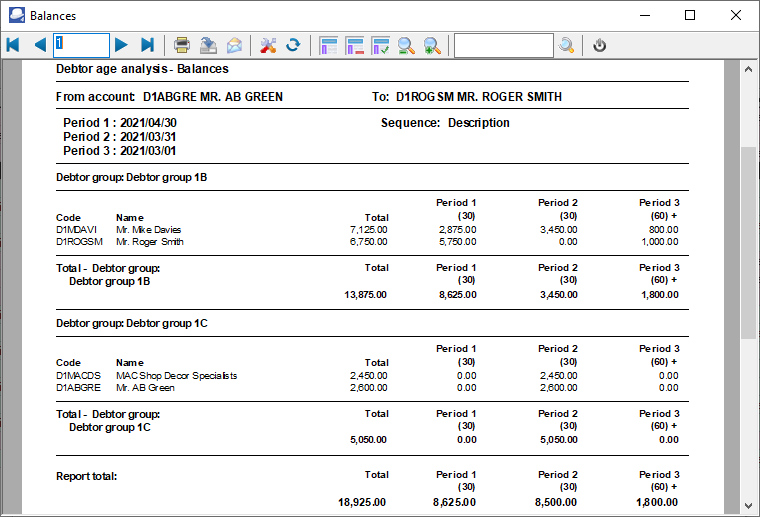
Debtors - Age analysis - Balances (Reports menu)
The Balances is a similar report as the Balances detail report. The Balances will only list the balances for each ageing period.
To print Debtor age analysis - Balances report:
1.Select the Reports → Debtors → Age analysis menu.
2.Select "Balances", if not already selected.
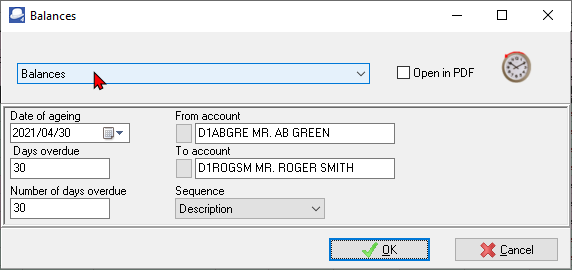
3.Select the following options:
a)Date of ageing - Select or enter a date to include the transactions on or before that date.
b)Days overdue - Enter the number of days for period 1.
c)Number of days overdue - Enter the number of days for period 2.
d)From account ...To account - Select a debtor (customer / client) account or a range of debtor (customer / client) accounts, to include in the report.
e)Sequence - Select "Debtor code" to print the report by account code or "Description" to print the report by account description (name).
3.Click on the OK button.
View the "Debtor age analysis - Balances" report: