
Debtor listing - List details (Reports menu)
The Debtor listing - List details report will display the Contact details, Registration details, Banking details, Reporting details, Accounting terms and information for each debtor (customer / client) account.
To print Debtor listing - List details reports:
1.Select the Reports → Debtors → Listing menu.
2.Select "List details", if not already selected.
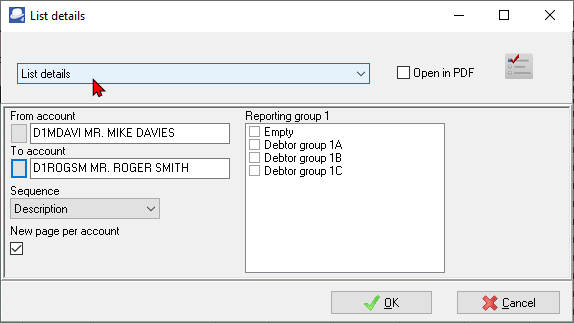
3.Select the following:
a)From account ... To...account - Select a debtor (customer / client) account or a range of debtor (customer / client) accounts, to include in the report.
b)Sequence - Select "Debtor code, Description, Reporting group 1 or Reporting group 2" to print the report details in the order (sort) in which you wish to display the data.
c)Reporting group 1 - Select a reporting group or more reporting groups. The report will only be printed for those debtor (customer / client) accounts linked to the selected Debtor reporting group 1.
4.Click on the OK button.
View the "Debtor list -Details" report
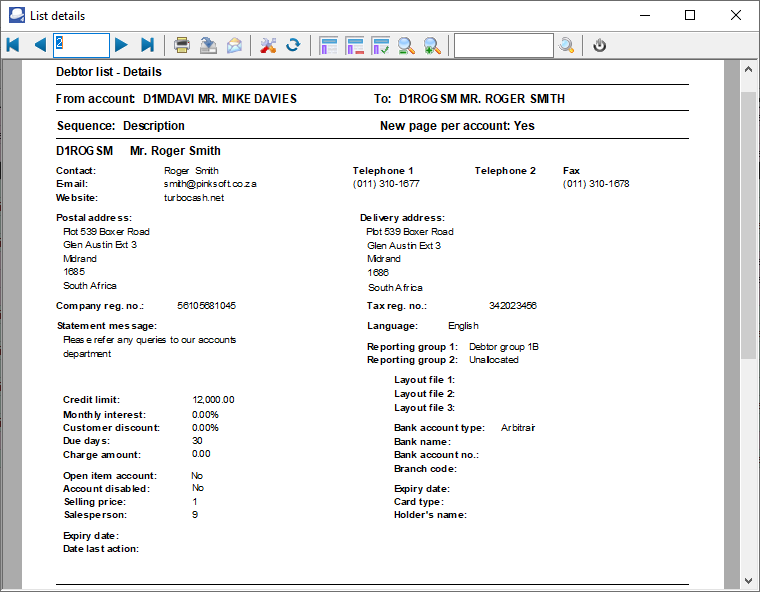
The List details report will display the following information:
1.Contact details - Contactperson, Telephone 1 / 2, Fax, E-Mail, Website, Postal address, Delivery address and Language of the debtor (customer / client).
2.Registration details - Company Registration number and Tax registration number.
3.Banking details - Bank account type, Name of Bank account, Bank account number and Branch code.
4.Reporting details - Reporting group 1 / 2, Layout file 1 (Invoices), Layout file 2 (Credit notes) and Layout file 3 (Quotes). If no layout files are selected, the documents will be printed for the global settings in Setup → System parameters → Documents setup.
5.Accounting terms and information - Statement message, Credit limit, Monthly interest rate, Customer discount rate, Due days (payment terms), account settings (i.e. Open item / Balance B/F), Account disabled, Default selling price and Salesperson.