Tools


This menu allows you to access various utilities and plugins / extensions.
You may also perform the global processes in a Set of Books to perform year-end procedures and to clear or reset the transactions and balances. The global processes should only be performed under certain circumstances.
To access the Tools menu:
1.On the Setup ribbon, select Tools. A list of the menu options will be displayed.
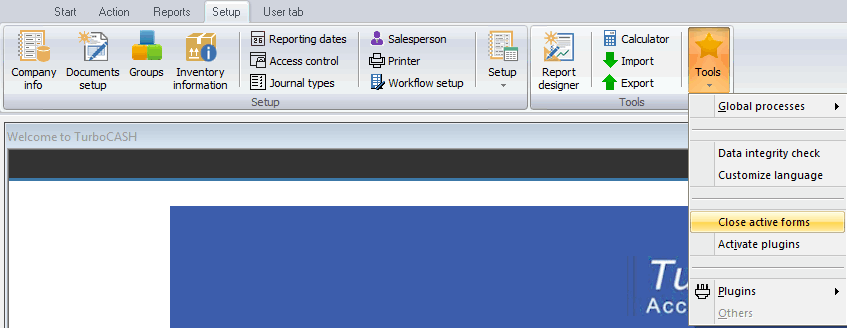
2.Select one of the available options:
a)Calculator - Launches the calculator.
b)Global processes - Clear or reset the transactions and balances, perform year-end procedures, reverse the transactions in posted journals and documents and copy the data from a selected Set of Books.
c)Search - Helps you search and / or filter for specific data.
d)Report designer - Design you own reports and layout files for documents from TurboCASH data.
e)T-Ledger analyzer - View and Export the Trial balance, Income statement, Balance sheet, Column balances for the Ledger, Customers, Vendors, etc.
f)Open item link – Manage links for accounts (i.e. General ledger, Customers and Vendors) set as open item accounts. You may also select to receive or make a payment.
g)T-Account viewer - View the accounts in the traditional T-Account format.
h)Export - Export data to a file - documents, accounts, customers, vendors, inventory items and posted journals.
i)Import - Import data from a file - documents, accounts, customers, vendors and inventory items.
j)Data integrity check - Check the integrity of the data for selected Set of Books.
k)Customize language - Customize the labels of the program.
l)Close active forms - This will close any open or active forms (i.e. Customers / Vendors / Inventory items and / or Documents).
m)Plugins – Access available plugins / extensions to the TurboCASH5 program.
|
Most of these plugins are licensed under commercial licenses. You need to purchase a license on which a registration code and instructions will be mailed to you to unlock the full features of these plugins. Multi-User and Plugins need to be registered in Tools → Plugins → Tools → Register plugins menu (Setup ribbon). |
Created with the Personal Edition of HelpNDoc: Full-featured Kindle eBooks generator
