Import / Export tab


The Import / Export tab on the on the Inventory item list screen will only be available when the mode in set to Default. In the Advanced mode, the Import / Export tab will not be displayed.
|
The inventory item screen may also be launched as a floating screen from the Input → Adjust inventory menu on the Action ribbon. |
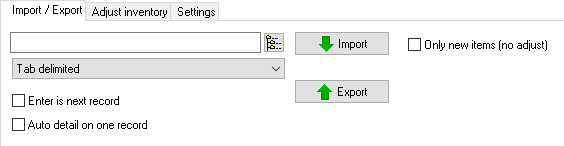
1.Export – Create an Export file in the following file formats:
a)Tab delimited (*.txt) (default).
b)Lotus Spreadsheet (*.Wk1).
c)Comma Separated Value (*.csv).
|
Inventory items may also be exported in Setup → Export (Inventory items). |
2.Import – Import a valid file exported via the Import option.
|
Inventory items may also be imported from Setup → Import (Inventory items). |
Created with the Personal Edition of HelpNDoc: Easy to use tool to create HTML Help files and Help web sites
