Edit Bank accounts


You may have more than one Bank account and wish to add this to your Chart of Accounts. TurboCASH will have set up a Bank account for you in your selected template. (In this example, account number “810-000 - Current Bank account” is used).
If you wish to change the Bank account description and journals name you my edit the account and journal types.
|
Bank accounts must be linked to a unique Payments and Receipts journal. You may create a new Payments and Receipts journal can create on the Bank tab when creating a new Bank account. You may edit the Journal type descriptions in Setup → Journal types. |
To change a Bank account:
1.On the Action ribbon, select Accounts. The Accounts screen; listing your available accounts will be displayed.
2.Select the “810-000 - Current Bank account” ("Current assets" – Reporting group).
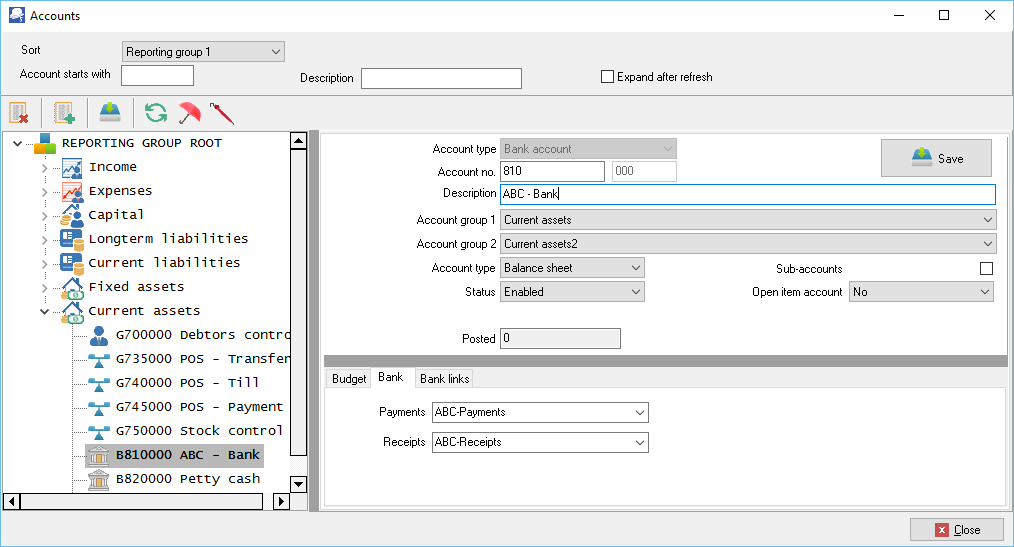
2.In the "Description" field, replace “Current bank account” with the new Bank account description e.g. “ABC-Bank”.
3.Click on the Bank tab.
4.Enter the unique name for the Payments and Receipts journals, e.g. “ABC-Payments” and the “ABC-Receipts”. This will automatically add (create) the journal types which may be edited in Setup → Journal types.
5.Click on the Save button.
Created with the Personal Edition of HelpNDoc: Generate EPub eBooks with ease
