Journal report - Documents (Reports menu)


Print the transactions of all posted invoices, credit notes, purchase and supplier return documents for a specific selected period.
To print Journal entry - Documents reports:
1.On the Reports ribbon, select Reports → Journal entry.
2.Select "Documents", if not already selected.
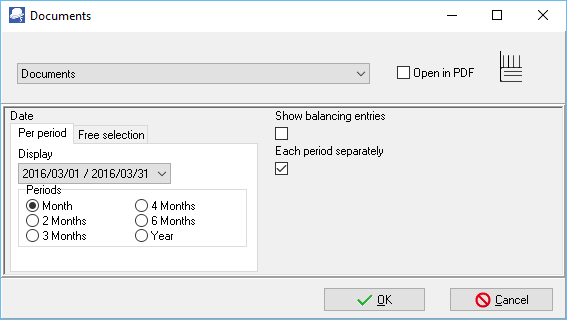
3.Select the following:
a)Period - Select the period on the Per period tab. You may click on the Free selection tab to select a specific date or a range of dates.
b)Show Balancing Entries - Not implemented.
c)Each period separately - Tick this option to print each period on a new page.
4.Click on the OK button.
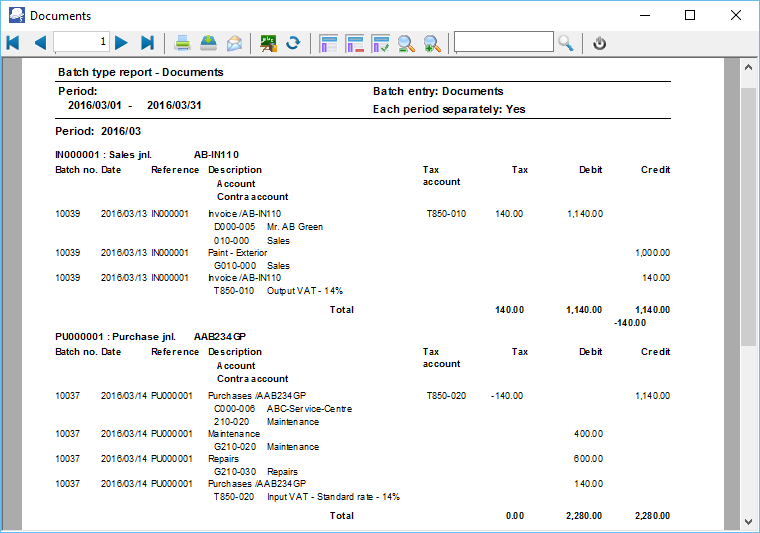
An example of the Journal entry (Documents) report, is as follows:
Page 1 -
Created with the Personal Edition of HelpNDoc: Write EPub books for the iPad