
Open item - Statements
The Open item link - Statement option displays the transactions of the selected account (i.e. debtor, creditor or ledger account).
|
|
The credit transactions which are linked to specific debit transactions of the same value, will not be displayed. If a transaction of a different amount is linked to a specific transaction, only the outstanding amount (difference) will be listed.
For example, an payment of 2,000.00 is received from the debtor (customer / client) on 2020/03/16. The payment is linked as follows:
As per this example -
|


Debtor statement - Outstanding vs Debtor statement
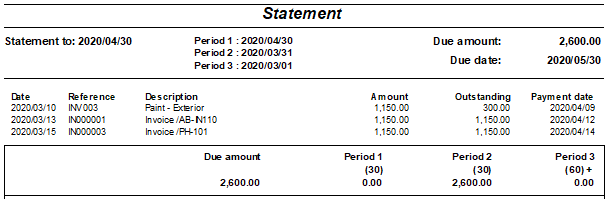
Debtor statement - Outstanding (due) list only the outstanding transactions.
|
|
The credit transactions which are linked to specific debit transactions of the same value, will not be displayed. If a transaction for a different amount is linked to a specific transaction, only the outstanding amount (difference) will be listed. |
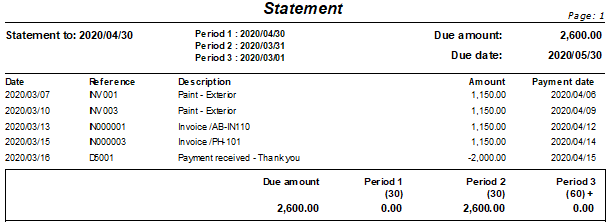
Debtor statement list all the transactions.
|
|
All the credit transactions which are linked to specific debit transactions of the same value, will be displayed. If a transaction of a different amount is linked to a specific transaction, the full amount of the transaction will be listed. |
View the "Debtors - Transaction list" report.

View the "Debtor transaction list - Open item" report.
