
Open item link - Transactions tab
The Transactions tab will list the transactions for open item accounts.
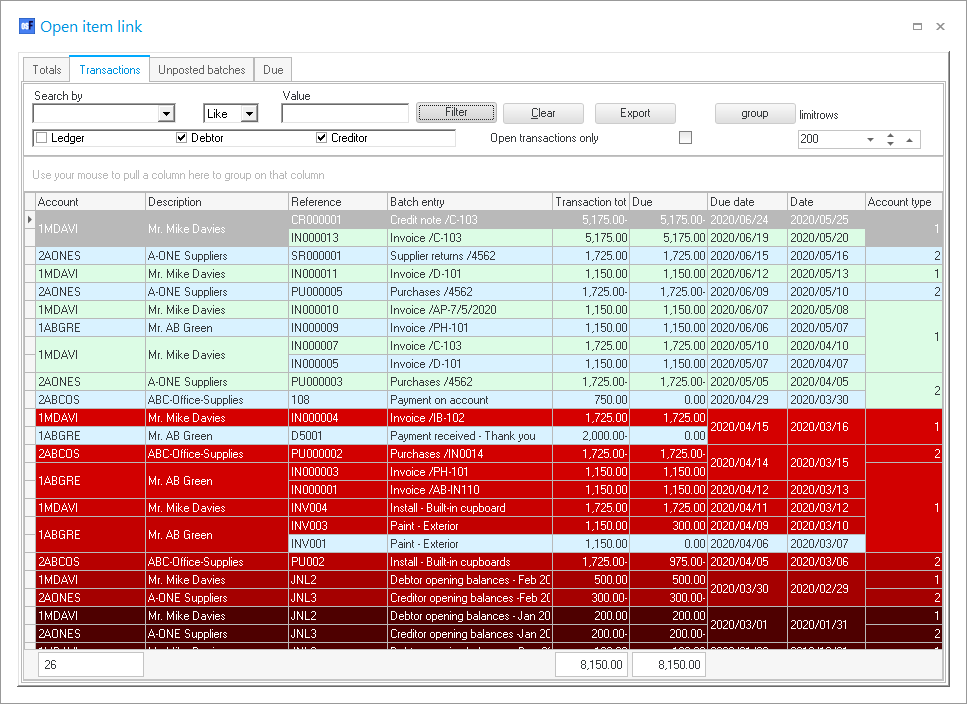
Filter options:
- Search by - Select any of the column headings and an operator (e.g. Like (default), =, <, >, <=, =>, or <> ) and enter a value. Click on the Filter button. Only those transactions matching your specified values will be listed. To clear the values, click on the Clear button.
- Account type - Select (tick) or deselect (remove the tick) to list the accounts for the selected account type(s) (Ledger, Debtors or Creditors).
- Open transactions only - By default, this option is not selected and will list all transactions, including those with a 0.00 balance. If this field is ticked, it will list only those transactions with a value of more than 0.00 in the "Due" column.
- group - Click on the group button to group the transactions on the list by "Month, From today, By date" and "By year".
|
|
You may also drag columns to the "Use your mouse to pull a column here to group on that column" row. |

- limitrows - Limit rows - 200 rows is the default number of rows or transactions to be listed. The number of rows may be specified (decreased or increased).
- Export - This button will create an Export.txt (Text files), which you may change the name and folder and save it. A Comma separated (CSV) file format is also available. Exported files can be used in a spreadsheet.