
Debtors with charge amount
TurboCASH5.2 provides this useful feature to generate transactions for those Debtor accounts, which have a charge amount entered in the Debtors (Accounting information tab).
|
|
When this charge amount is generated and once the batch has been posted, the Debtor accounts will be increased (debited) and the selected contra account (e.g. income account) will also be increased (credited). |

To generate multiple transactions for debtors with charge amount:
- On the Default ribbon, select Batch entry (F2).
- Select the Batch type (except Payment and Receipt Journals, which is linked to Bank accounts) and click on the Open button.
- Enter the Alias (batch name) in the Change alias field.
- Click on the F10:Setup icon and select the Contra account.
- Press or click on the F9: Process icon. The "Process the batch" screen will be displayed.
- Select the "Generate multiple transactions" option.
- Select the Debtors with charge amount option.
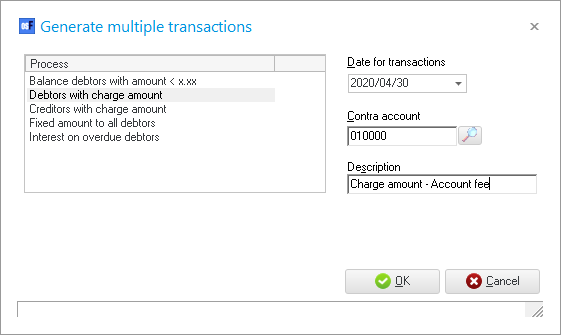
- Select and enter the following:
- Date for transactions - Enter or select the date for which the transactions should be generated.
- Contra account - Do not select.
|
|
The selected contra account is not stored. The contra account needs to be selected in the F10:Setup batch before balancing the batch. |

- Description - Change "My Description" with any description to suit your requirements.
|
|
The description must be useful to your debtors, since it will be displayed on Debtor statements. |
- Click on the OK button. The Generate multiple transactions screen will automatically be closed, and the transactions for the Debtors which have charge amounts entered in the Accounting information tab of the Debtor account, will be imported into the selected batch.
- Click F10:Setup and select the contra account.
- Click F5:Balance to generate balancing entries to the contra account.
- Check the transactions and, if necessary, change the descriptions, etc.
|
|
Once you have finished entering / editing the transactions in the batch you need to: -
|