
Balance debtors with amount < x.xx
You may generate transactions for those Debtor accounts, which have an outstanding balance of less than the amount you specify.
|
|
This feature may be used if you decide, for example, to write-off all debts of all the debtors who owe less than a specified amount, which are considered uneconomical to recover. |

To generate multiple transactions for debtors with an outstanding amount less than a specified amount:
- On the Default ribbon, select Batch entry (F2).
- Select the Batch type (except Payment and Receipt Journals, which is linked to Bank accounts) and click on the Open button.
- Enter the Alias (batch name) in the Change alias field.
- Click on the F10:Setup icon and select the Contra account.
- Click on the F9: Process icon. The "Process the batch" screen will be displayed.
- Select the "Generate multiple transactions" option.
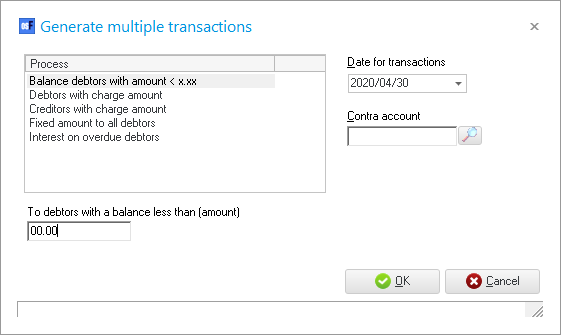
- Select and enter the following:
- Date for transactions - Enter or select the date for which the transactions should be generated.
- Contra account - Do not select.
|
|
The selected contra account is not stored. The contra account needs to be selected in the F10:Setup batch before balancing the batch. |

- To debtors with a balance less than (amount) - Specify an amount for which debtors owing less than this amount should be listed in the batch.
- Click on the OK button. The Generate multiple transactions screen will automatically be closed, and the transactions for the Debtors will be imported into the selected batch.
- Check the transactions and, if necessary, change the descriptions, etc.
|
|
Once you have finished entering / editing the transactions in the batch you need to: -
|