
Quotes - Graph (Reports menu)
The following two (2) graph reports to analyse Quotes, which are posted and / or confirmed, for a specific period, may be printed:
•Graph - Quotes per week - Quantities - displays the total quantities of items on the "Quantity shipped" field of Quotes per week in a bar chart.
•Graph - Quotes per week - Turnover - displays the total selling price amount (excluding tax) of Quotes per week in a bar chart.
|
|
This graph only includes Quotes which are posted and / or confirmed. Unconfirmed or open Quotes will be NOT be included in this report. |

To print Graph - Quotes per week reports:
1.Select the Reports → Sales → Quotes → Graph menu.

2.Select the following:
a)Report - Select the Graph - Quotes per week - Quantities or Graph - Quotes per week - Turnover report.
b)Period - Select a period on the Per period tab. You may click on the Free selection tab to select a specific date or a range of dates to include in the graph.
3.Click on the OK button.
An example of the "Graph - Quotes per week - Quantities", is as follows:

The details is as follows:
1.Vertical Axis - The total quantities on Quotes per week.
2.Horizontal Axis - This is the Number of the Week in the calendar year (1 to 52).
3.Totals - Quotes - The total quantities of all Quotes for the selected period.
An example of the "Graph - Quotes per week - Turnover", is as follows:
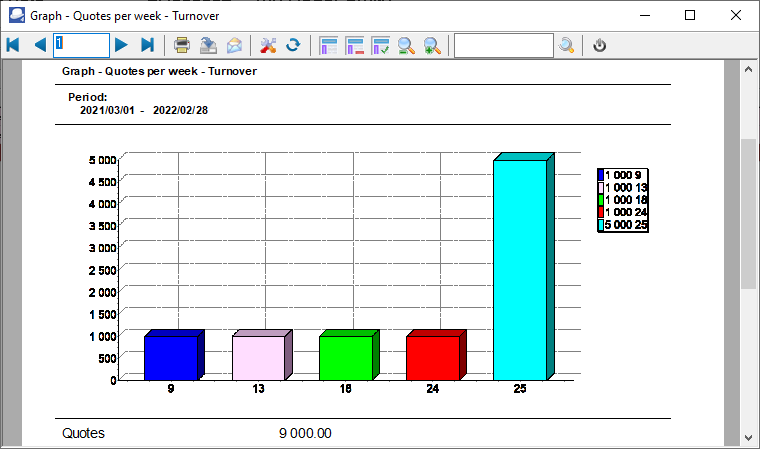
The details is as follows:
1.Vertical Axis - The total amount for Quotes per week.
2.Horizontal Axis - This is the Number of the Week in the calendar year (1 to 52).
3.Totals - Quotes - The total amount (exclusive of tax) of all Quotes for the selected period.