
Export Debtor accounts
Using this facility, you may also export certain data for the Debtor (customer / client) accounts in an open Set of Books to XML Database format, or any available format on your system.
All the information for each account as entered in Edit → Debtors (includes specific data for debtor (customer / client) accounts), will be exported in the selected file format.
To export Debtor (customer / client) accounts:
1.Select Tools → Export. The "Export Data to File" screen will be displayed.
2.Click on the Debtors button, if not selected. The screen will change to display the options for the Debtors: 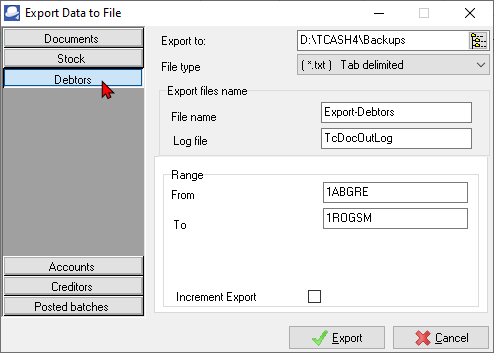
3.Select and / or enter the following:
a)Export to - The installation directory in which TurboCASH is installed, will be displayed. You may click on the Browse icon to select a folder on the Browse for Folder screen. You may then select any available folder, or drive, on your system into which you wish to export the data.
b)File type - Select to export the file in the XML Database (*XML), Comma Separated Variable (*CSV), Lotus Spreadsheet File (*WK1), MS Excel Spreadsheet (*XLS), or any other format available on your system from the list.
|
|
The *.TXF TurboCASH Exchange File format is not implemented. An information message will display "Import file format not implemented!", when exporting accounts. |

c)Export files name - Enter the File name. You need to select this file at a later stage when you wish to import the file, or analyse the data in a spreadsheet.
d)Log file - Enter the Log file name.
e)Range - From ... To - The Debtors lookup will be automatically initiated. Select any range of accounts to include in the export file.
f)Increment Export - Leave this option blank.
4.Click on the Export button. TurboCASH will create the export file, and save it in the specified directory.
|
|
The information for the Debtors, which will be exported, is: •Account code. •Description or name. •Contact persons. •Account code. •Postal and Delivery addresses. •Two Telephone numbers and Fax number. •E-mail addresses. •Credit limits. •Charge amounts. •Discount. •Monthly interest percentage. •Discount. •Disabled account indicator. •Open item debtor indicator. •Statement messages. •Reporting groups 1 and 2. •Salespersons. •The last date a transaction was entered for the debtor (customer / client) accounts, will also be included into the selected export file. |