
Creditor groups
This option allows you to set up to two Reporting groups for your Creditors. Creditor groups allows you to group or categorise the Creditor (supplier / vendor) accounts on which you would like to report.
These Creditor groups can be linked to each Creditor on the Edit → Creditors menu, on the Accounting information tab.
To set Reporting groups for Creditor (supplier / vendor) accounts:
1.Click on the Setup → System parameters → Groups menu. The Groups (Account group 1 (default)) screen will be displayed.
2.Click on the Creditor group 1 button. 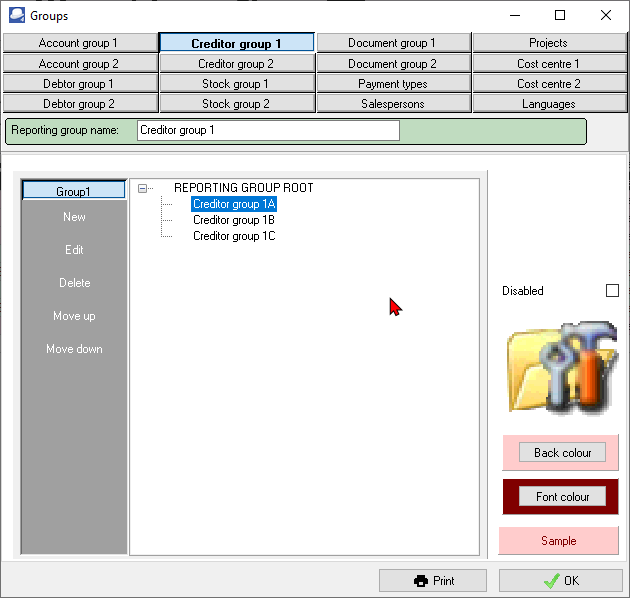
3.If you wish to rename the Reporting group name - Creditor group 1, over-type the description with your new description. This will change the description of the button for Creditor group 1.
4.To add a new Group to the root directory or list, select the REPORTING GROUP ROOT on the list and click on the New button.
5.Enter the name of your Creditor group 1 and click on REPORTING GROUP ROOT on the list.
6.Repeat the process until you have entered all the Creditor groups, etc.
7.If you need to add Reporting group 2 for Creditors, click on the Creditor group 2 button and repeat the process as for Creditor group 1.
8.Click on the OK button to save your changes and close (exit) this screen.
|
|
You may click on the Print button to print a list of your creditor groups. |

|
|
You may set colours to display on the Creditor (supplier / vendor) accounts list screen. To do this, click on the Back colour button to set the rows background colour and the Font colour button to set the Font colour. |