
Context-menu - Totals
This context-menu option, will list an information screen with the calculated totals of selected document(s).
To view the totals on selected documents:
1.On Input → Documents (Documents list screen), select the Document type, if the correct document type is not selected.
2.Select the document(s) and right-click.
|
|
If you need to select multiple documents, press the Ctrl key and click on each document, you need to include in the totals. |

If you need to select multiple documents, press the Ctrl key and click on each document you wish to copy. On the context-menu, select the Others → Totals option.
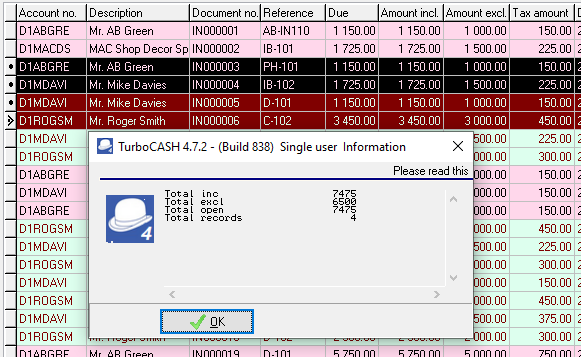
This will display the following:
•Total inc - Total amount of the selected documents inclusive of Tax (VAT/GST/Sales tax).
•Total excl - Total amount of the selected documents exclusive of Tax (VAT/GST/Sales tax).
•Total open - Total of documents which are not yet posted (updated to the ledger).
•Total records - The total number of documents selected. . You may select to show the details of the items, quantities and comments added to documents. When a document is selected or the scrolled on the list, the details will be displayed.