Open item link - Totals tab


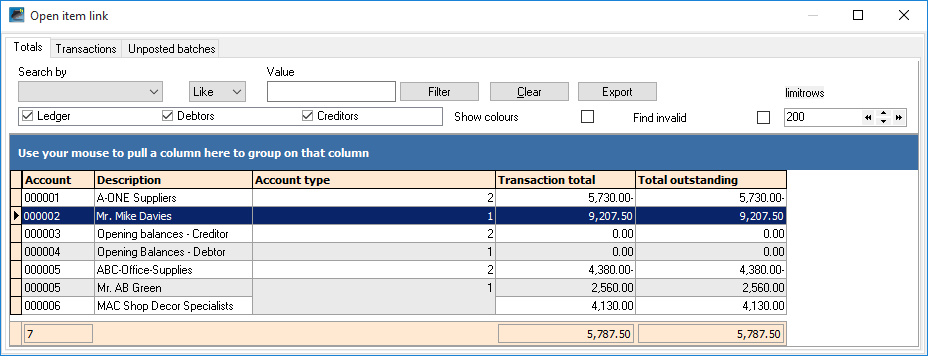
The Totals tab will list the transaction total and total outstanding total for open item accounts.
|
Account type: •1 - Customer accounts (Open item account field selected (ticked) on the Accounting information tab in Action → Customers). •2 - Vendor accounts (Open item account field selected (ticked) on the Accounting information tab in Action → Vendors). •0 - General ledger (Open item account field set to Yes in Action → Accounts). •3 - Bank accounts (Open item account field set to Yes in the Action → Accounts). •4 - Tax accounts (Open item account field set to Yes in the Action → Accounts). |
Filter options:
1.Search by - Select any of the column headings and an operator (e.g. Like (default), =, <, >, <=, =>, or <> ) and enter a value. Click on the Filter button. Only those transactions matching your specified values will be listed. To clear the values, click on the Clear button.
2.Account type - Select (tick) or deselect (remove the tick) to list the accounts for the selected account type(s) (Ledger, Customers or Vendors).
3.Show colors - To be advised.
4.Find invalid - Select (tick) and click on the Filter button to list those accounts and transactions which have incorrect links .
5.limitrows - Limit rows - 200 rows is the default number of rows or transactions to be listed. The number of rows may be specified (decreased or increased).
6.Export - This button will create an Export.txt (Text files), which you may change the name and folder and save it. A Comma separated (CSV) file format is also available. Exported files can be used in a spreadsheet.
|
You may also drag columns to the "Use your mouse to pull a column here to group on that column" row. |
Created with the Personal Edition of HelpNDoc: Write EPub books for the iPad

