
Delete reports
You may delete a report from the User reports menu, or your own reports.
If a report, which contains parameters, is deleted both the report (*.rep) and parameter (*.dfm) files will be deleted.
|
|
All reports which are required to manage the reporting is listed Reports - File structure and should not be deleted or changed. Do not select any of the standard reports in the Reports menu (stored in the .../plug_ins\reports\systemreports folder). See Reports - System reports - File names should not be deleted or renamed. |

To delete a report:
- On the "Report man" screen, select the report you wish to delete.
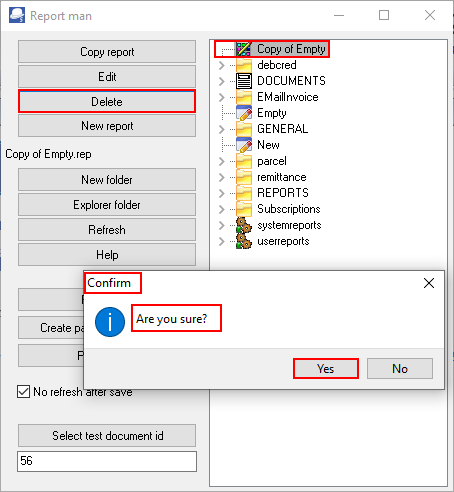
- Click on the Delete button. A confirmation message will be displayed.
"Are you sure?"
- Only if you are absolutely sure, click Yes to delete the selected report.
|
|
Once a report is deleted, the report is lost. |