
Document status
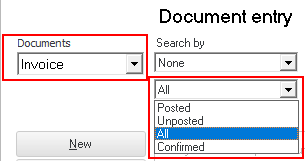 The Document list screen can be filtered by the document status for existing Invoices, Credit notes, Purchases or Supplier returns, Orders and Quotes, as follows:
- Unposted documents - This is the default option on the Document list screen. Any document (Invoice, Credit note, Quote, Purchase, Supplier returns or Orders) may be edited, if it is not yet updated or posted to the ledger.
- Posted documents - If you deselect (remove the tick) in the Unposted option on the Document list screen, you may view the documents as they were originally processed in the Document entry screen before these documents were updated (posted) to the ledger.
|
|
The reason for this is, that quotes and orders cannot be posted (updated) to the ledger. Quotes need to be converted to Invoices and Orders need to be converted to a Purchase documents. Once a Quote or Order is confirmed, the Status will change to "Posted". |

- Confirmed - The status for Quotes and Orders will may be filtered as Confirmed, Posted or Open, Document list screen. In the Document entry header of Quotes and Orders, the "Status" may also be changed.

When a Quote or Order is created, the Status is set as Open. Once a Quote or Order is confirmed, the Status will change to "Posted". You may change it to "Confirmed" when editing the Quote or Order.