
Reports - userreports - File names
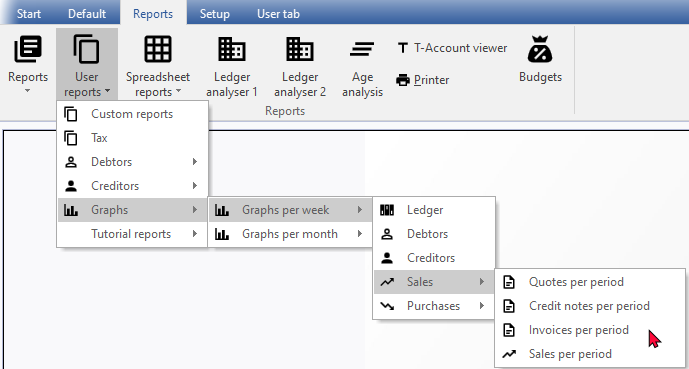
User reports menu
These user reports are stored in the “...\plug_ins\reports\userreports” folder of your installation directory. These user reports are not included in the osFinancials5 installation, but is included in the TurboCASH5.2 installation.
When printing reports using the “Material” theme, the icons in the “Material” theme folder will be displayed in menus and the icons in the “Classic” theme folder will be displayed on the report parameters screens and in Reportman. For your convenience, a list of the file names and structure of the reports in the User reports menu (Reports ribbon) is as follows:
To access the Report designer:
- On the Reports ribbon or the Setup ribbon, select Report designer.
- The Report designer will list all userreports files and report folders as follows:

User reports menu - File names
|
Menu item |
Sub-menu item 1 |
Internal folder name / Report name |
Internal report name |
Classic theme |
Material theme |
Old icon TC5.1 |
|
Custom reports |
|
|
|
|
|
|
|
|
|
|
2cred-sku-det.rep |
|
|
|
|
|
|
|
2deb-sku-det.rep |
|
|
|
|
Tax |
|
TRN_906583 |
Tax codes - Tax rates |
|
|
|
|
Debtors |
|
TRN_160 |
|
|
|
|
|
|
|
Graph - Debtors per week |
TRN_906168.rep |
|
|
|
|
|
Age analysis |
TRN_65 |
|
|
|
|
|
|
|
Balances detail |
TRN_906142.rep |
|
|
|
|
|
|
Balances detail history (open item) |
TRN_906143.rep |
|
|
|
|
|
|
Balances |
TRN_906147.rep |
|
|
|
|
|
Outstanding |
TRN_947 |
|
|
|
|
|
|
|
Due date |
TRN_2222.rep |
|
|
|
|
|
|
Debtors Outstanding at date |
TRN_906104.rep |
|
|
|
|
Creditors |
|
TRN_161 |
|
|
|
|
|
|
|
Graph - Creditors per week |
TRN_906167.rep |
|
|
|
|
|
Age analysis |
TRN_65 |
|
|
|
|
|
|
|
Balances detail |
TRN_906142.rep |
|
|
|
|
|
|
Balances detail history (open item) |
TRN_906143.rep |
|
|
|
|
|
|
Balances |
TRN_906147.rep |
|
|
|
|
|
Outstanding |
TRN_947 |
|
|
|
|
|
|
|
Due date |
TRN_2222.rep |
|
|
|
|
|
|
Creditors Outstanding at date |
TRN_906103.rep |
|
|
|
|
Tutorial reports |
|
Debtors and Creditor Listing - Reportman basic examples |
|
|
|
|


Graphs
Graphs - In addition to the Graphs per week, Graphs per month is introduced.