
Reportman View Dataset
To view the datasets:
- On the "Report manager designer" screen, click on the
 Data access configuration icon
 - Select the Dataset from the list and click on the Show data button.
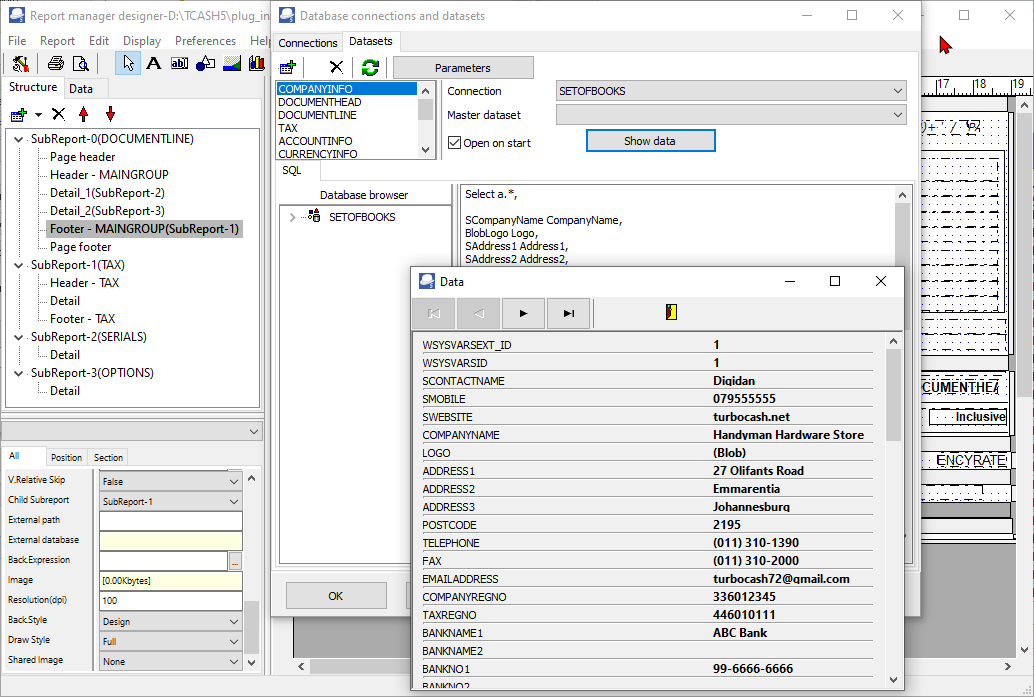
- In this example, the Data (for the "COMPANYINFO" Dataset) is as follows:
If you click on the  Exit button, you will return to the "Database connections and datasets" screen. You may view other Datasets.
- For example, if you view the "DOCUMENTLINE" Dataset, and you have more than one line in the document (transactions and / or comments), you may click on the
 Next and
  First record buttons to view the transactions / and or comments.
 - Click on the OK button of the "Database connections and datasets" screen.