
Edit Bank accounts
You may have more than one Bank account and wish to add this to your Chart of Accounts. osFinancials5 (or TurboCASH5.2) will have set up a Bank account for you in your selected template. (In this example, account number “810-000 - Current Bank account” is used).
If you wish to change the Bank account description and batches name you my edit the account and batch types.
|
|
Bank accounts must be linked to a unique Payments and Receipts batch. You may create a new Payments and Receipts batch can create on the Bank tab when creating a new Bank account. You may edit the Batch type descriptions in Setup → Batch types. |

To change a Bank account:
- On the Setup ribbon, select Setup → Accounts. The Accounts screen; listing your available accounts will be displayed.
- Select the “810-000 - Current Bank account” ("Current assets" – Reporting group).
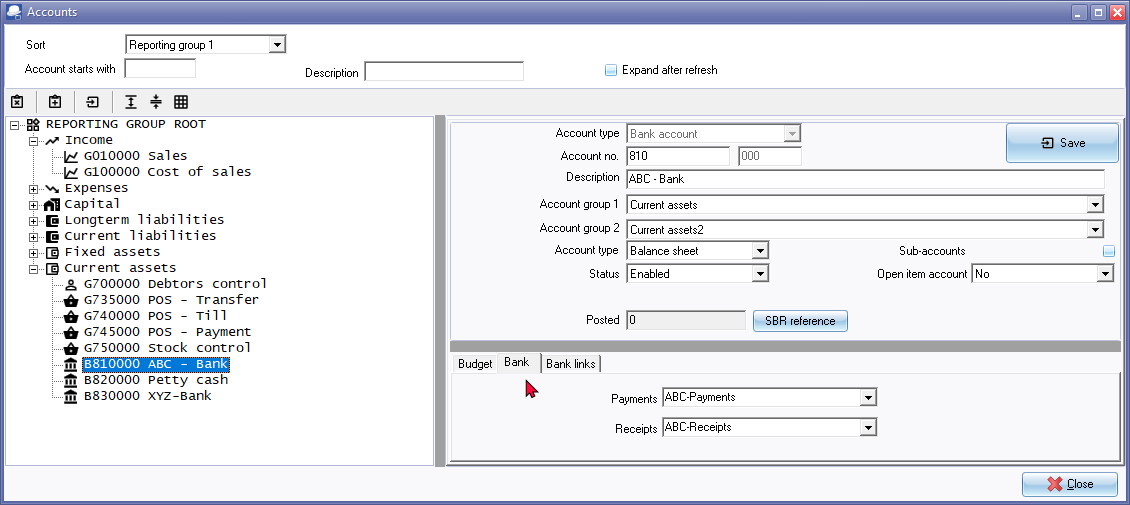
- In the "Description" field, replace “Current bank account” with the new Bank account description e.g. “ABC-Bank”.
- Click on the Bank tab.
- Enter the unique name for the Payments and Receipts batches, e.g. “ABC-Payments” and the “ABC-Receipts”. This will automatically add (create) the batch types which may be edited in Setup → Batch types.
|
|
Bank import plugin - Is included in the TurboCASH5.2 Subscription - Bank Reconciliations Plugin Manual - BankImport Plugin Manual - If the “Default bank reconciliation method” option is not selected (tick removed) on the Setup → System parameters (Setup ribbon); the Payments and Receipts batch fields will be combined. You may then select either the Payments journal or the Receipts journal.
|


- Click on the Save button.