
Debtor accounts - Delivery address tab
Delivery address tab - Enter delivery address, and messages and settings for layout files.
- The Delivery address tab is the default when accessing the Debtors on the Default ribbon.
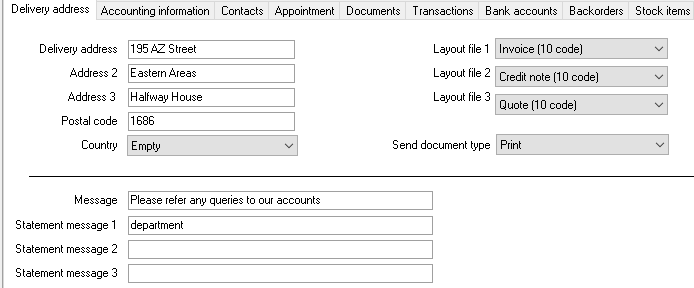
- Enter and / or select the following on the Delivery address tab, if necessary:
- Delivery address, Address 2, Address 3 - Enter up to 3 address lines.
- Postal code - Enter the postal code or zip code.
- Country - Default is Empty. You may select the Country.
- Message, Message 1, Message 2 and Message 3 - Enter the message for the debtor (customer / client) account. This message will be displayed on Statements printed in Reports → Reports → Debtors → Statements.
|
|
This statement message is only applicable for the selected debtor (customer / client) account. You may also enter a global statement message to be displayed on statements for all debtor (customer / client) accounts in Setup → Documents setup - Statements tab. |

- Layout files
|
|
If no layout files have been selected for the debtor (customer / client) on this tab, the default settings as set for Invoices, Credit notes and Quotes (Setup → Documents setup) will be used. |
- Layout file 1 - Invoice - Layout file - If you have a specific Invoice layout file for the this debtor (customer / client), you may select it.
- Layout file 2 -Credit note - Layout file - If you have a specific Credit note layout file for the this debtor (customer / client), you may select it.
- Layout file 3 - Quote - Layout file - If you have a specific Quote layout file for the this debtor (customer / client), you may select it.
- Send document type - This is only applicable to the E-mailPro plugin. Print document is the default. Other options are; Print document and send email or Email. To use this feature, you need to activate and purchase the E-mailPro plugin and need to set it to print to a printer.
- Click on the Accounting information tab to enter and select settings and accounting terms.
- Once finished, click on the Save button.