
Budgets - Transactions tab (Reports ribbon)
The Transaction details tab lists all the budget records for the selected periods or dates selected on the options section of the Budget tab.
You may overtype any amount, add or edit references and descriptions, as necessary.
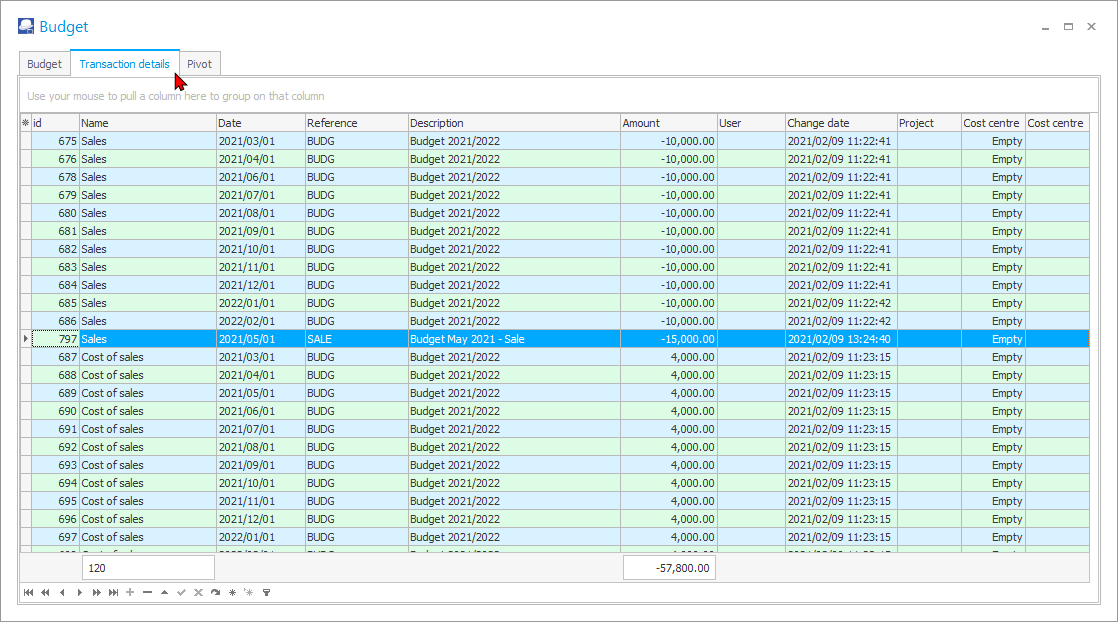
The details of the columns, is as follows:
- id - The ID or record ID is automatically generated for each budget entry.
- Name - Account name or description
- Date - The date for the period of the budget entry.
- Reference - The default Reference "BUDG" or your reference as entered on the options section of the Budget tab.
- Description - The default Description "Auto budget" or your description as entered on the options section of the Budget tab.
- Amount - The amount for the budget entry. The total debit amounts an credit amounts (prefixed by a - (minus sign)) will be listed.
- User - If Users were added in Setup → Access control (Setup ribbon), the name of the user or users will be listed.
- Change date - The date and timestamp on which the budget amount is entered or changed.
- Project - If budgets were entered or processed for Projects, the project code will be listed. You may select a different Project code, if required.
- Cost centre 1 - If budgets were entered entered for Cost centres (Cost centre 1), the Cost centres for Cost centre 1 will be listed. You may select a different Cost centre 1 code, if required.
- Cost centre 2 - If budgets were entered entered for Cost centres (Cost centre 2), the Cost centres for Cost centre 2 will be listed. You may select a different Cost centre 2 code, if required.