
Salespersons
This option allows you to add / delete the salespersons, who sell your stock items or services. Salespersons may be selected on sales documents (quotes, invoices point-of-sales access and credit notes).
The Salespersons are also added to the purchase documents (orders, purchases and supplier returns). This feature is useful to manage a user / salesperson / cashier who have processed a specific purchase document.
|
|
You may select the default salesperson for each debtor (customer / client) account. When sales documents are generated and the debtor (customer / client) account is selected, the default salesperson will be displayed for the document or you may select any available salesperson. |

This feature makes it easy to see who made the most sales or did not make target. It is also a useful tool if it is necessary to pay commission on those sales.
|
|
Salespersons may also be selected for purchase documents (i.e. purchases, supplier returns and orders). This allows you to see who handled the purchase document. |
|
|
You may also link the salespersons (cashiers) to users on the Others tab of the Setup → System parameters → Access control menu for improved Point-of-Sale access and security. |
To add Salespersons:
|
|
Salespersons may also be added or deleted in the Setup → System parameters → Groups (Salespersons) menu. |
1.Click on the Setup → System parameters → Salesperson menu. The "Salesperson" screen is displayed:
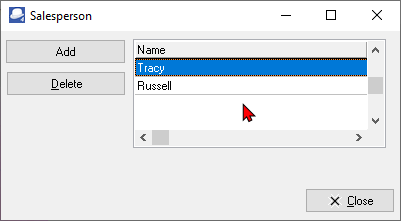
2.Click Add button and enter the name of your salesperson.
3.Click on the Close button.