
Release notes - April 2021
RELEASE NOTES – TurboCASH4 (838)
License unchanged
license.rtf - GNU Public license
Support.txt Updated
Support :
http://www.turbocash.net/pages/TCBuy.html#support
Forum :
https://accounting.ning.com/forum/topics
E-mail :
philip@pinksoft.co.za
.>
Open a Support Ticket
TurboCASH4
Upgrades available :
TurboCASH5
TurboCASH5.2
Themes Updated and Fixes
Theme added
Material theme (Default install) Fixed and added missing icons. Accounting Made Easy tutorials updated on the Material theme for 2021.
Themes fixes
Human theme
Human theme causes on Debtors and Creditors buttons on the sidebar error “Out of Resources the Debtors and Creditor accounts are not listed – The filter options (fields (columns)) are empty.
Edited Debtors and Creditors icons – added a 24 x 24 icon to the existing 48x48 - 24 bit (true color) icons and removed the 256x256 icon – Loading perfect after editing the icons.
Future House – Classic icons
White spaces on Debtors.ico and Creditors.ico on Documents launched from the sidebar
Added 48x48 and 24x24 (24-bit icons) in Classic themes folder.
UPDATES / FIXES to Books in Repository
Financial Year Start date – set to 2021
All books set to 2021
Books starting in July set to 1 July 2020 to 30 June 2021
Quote => Estimates
Changed Quote to Estimates in Documents setup and QU to ES document number prefix
•EN-CANADA-OTHER
•EN-CANADA-CORPORATION
•EN-USA Quote layout file and Vendor returns layout file was POS-STARTSP100
•EN-USA-CALIFORNIA
Layout file point-of-sale - Default A4 =>POS – STARTSP100
•EN-CANADA-OTHER
•EN-CANADA-CORPORATION
Layout files set Default layout is Documents setup
Set all Books in Repository set to layout files as follows in the Tutorials and Repository:
1.Invoices - Invoice (15 code) TRN_906206.rep
2.Credit notes - Credit note (15 code) TRN_906207.rep
3.Purchases - Purchase (15 code) - TRN_906209.rep
4.Supplier returns - Supplier return (15 code) TRN_906210.rep
5.Orders - Order (15 code) TRN_906211.rep
6.Quotes - Quote (15 code) TRN_906208.rep
Layout files for Debtors / Creditors set to blank as it uses the global setting in Setup → Documents setup
Generic layout files Document layout does not print the Document type S.TYPES – Document layout files not supported in TurboCASH4 and is excluded from the TurboCASH4 install. Implemented in TurboCASH4 (4.0.0.969) and in TurboCASH5.2.
1.Document layout (TRN_3174.rep)
2.Document layout (no codes) (TRN_906278.rep)
3.Document layout (10 code) (TRN_906276.rep)
4.Document layout (15 code) (TRN_906277.rep)
5.Layout file (TRN_1910.rep)
Language files Updated
American fixed language file + typos
Updated for the following 25 languages.
Links Updated in Language files in Ini Files and Setup Files
Help menu links
“Domain: turbocash.ning.com
is free to take
If you are willing to buy "turbocash.ning.com" domain
please check the following links:”
3114 - Forum - http://turbocash.ning.com/forum => https://accounting.ning.com/forum/topics (need to Sign In - accounting (ning.com) )
3113 - Bug reports - http://turbocash.ning.com/page/reporting-bugs => https://accounting.ning.com/forum/topics (need to Sign In - accounting (ning.com) )
3115 - Webshop - http://turbocash.ning.com/page/ads-page => https://www.turbocash.net/pages/TCBuy.html
3116 - Support ticket - http://turbocash.ning.com/page/opening-a-support-ticket => https://www.turbocash.net/pages/TCBuy.html#support
Broken links
ID3100 You are trying to connect to a remote database! This version does not support that by default! Please contact us at http://www.osf-boekhoudpakket-administratie.nl/index.php/en/webshop to support the project and receive your multi-user license!
ID3117 Unregistered version! Please buy this plugin at http://www.osf-boekhoudpakket-administratie.nl/index.php/en/webshop and support the TurboCASH4 development.
ID3118 This demo plugin allows %s records to be entered. If you need more, please buy the product at http://www.osf-boekhoudpakket-administratie.nl/index.php/en/webshop
ID3120 :Time license expires in 1 day! Please contact http://www.osf-boekhoudpakket-administratie.nl/index.php/en/webshop
ID3121 :Time license expires in %s days! Please contact http://www.osf-boekhoudpakket-administratie.nl/index.php/en/webshop
ID20078 This version will only work till 1-3-2005 for more info go to http://www.osf-boekhoudpakket-administratie.nl/index.php/en/webshop
https://www.osfinancials.org/en/webshop
3122 turbocashlive.com in French, Estonian, Slovenian, Swedish, Turkish languages
3100 turbocashlive.com in Spanish, German, Indonesian, Swahili and Xhôsa languages
Language files not changed
Cannot load these in my system configuration
•ar-Arabic
•el-Cypres
•el-Greek
•th-Thai
Language files – All other language files Updated
Afrikaans
ID 30 Krediteur => Krediteure
ID 31 Debiteur => Debiteure
Typos in the 26 English translation files
•ID31 Debtor => Debtors
•ID30 Creditor => Creditors
•ID3104 T-Ledger analyser => Ledger analyser
•ID 214 Unit Size => Units
•ID 706 Credit note changed to Credit notes see document setup - All other document types are in plural on the tabs.

•ID 838 Contact => Contacts
•ID 1753 Incl/Excl mode => Incl./Excl. mode
•ID 3409 Postalcode / tax id / regno lookup - changed to Postal code / tax id / reg. no. lookup in US to Zip code / tax id / reg. no. lookup
•ID 190 Postal code changed to Zip code (see Company info screen) for American
•ID 214 Units changed to Units
•ID3276 + ID903141 uppercase to upper-case
•ID1753 Incl/Excl mode changed to Incl./Excl. mode
•ID541 Please select a Set of Books from the list below or click Bowse button to select the Set of Books you wish to copy in a folder elsewhere on your system. Fixed Browse
•ID718 Or trouble on a network maped drive mapped
•ID334 Next ret. No . In other English languages changed to Next vendor return no.
•ID704 Next vendor ret. no. to Next vendor return no.
•ID270 Date of ageing to Date of aging (American only)
•ID766 Cannot transfer tansactions to the same account! => transactions
•ID906048 Vednor contact list to Vendor returns (American only)
•ID3336 Next jounal no. => journal (American only)
•ID2064 Ageing to Aging (American only)
•ID906443 Ref. No. hanged to Ref. no.
•ID830 Please contact your TurboCASH4 administator! Fixed administrator
•ID3349 There is document input asossiated with this project! Do you wish to continue ? All project data will be lost! Changed to
There is transaction(s) associated with this project! Do you wish to continue ? All project data will be lost!
•ID3350 There is transaction input asossiated with this project! Do you wish to continue ? All project data will be lost! => There is document(s) associated with this project! Do you wish to continue ? All project data will be lost!
•ID3422 You are not yet registered to post on our forum! You will need to register TurboCASH4 to use that username password to login to our forum or shop. => Welcome to the forum. You need to sign up, or sign in, to post on our forum! (No need to Register TurboCASH4 to sign in or to register on the forum)
•ID906553 VAT list vendor with tax id => Tax list vendor with tax id
•ID3675 VAT list customer with tax id => Tax list customer with tax id
•3674 Do you want to run this process for 1 creditor? => Do you want to run this process for 1 vendor?'
•etc.
Repository Fixes
Repository - Books not Linked to correct Language
Linked to correct System lang - language files in Setup → System parameters → Access control.
•EN-ISLEOFMAN
•EN-TRINIDADTOBAGO
•FR-BOOKS Linked to Français
Unallocated => Empty – Reporting groups 1 / 2
In some databases (Sets of Books), the “Empty” tag for Reporting groups were displayed the same as the “Unallocated” tag.
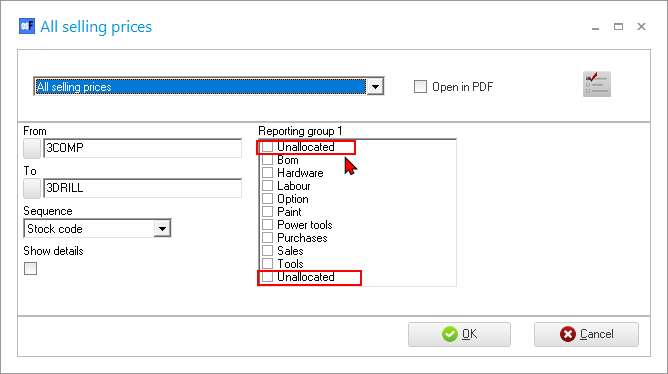
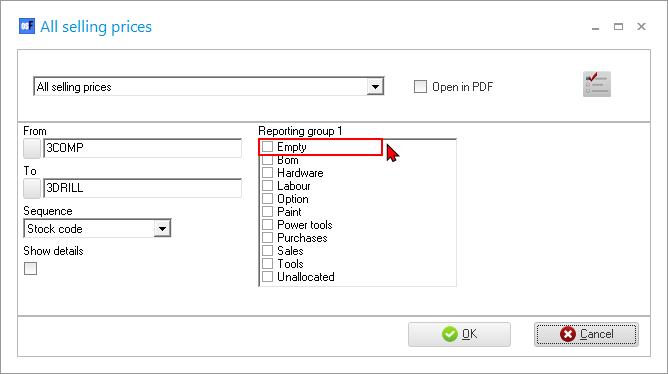
On Tools → Customize language, the “Groups empty account” is set to “Unallocated”

Changed as follows:
1.Overtype “Unallocated” with “Empty”.
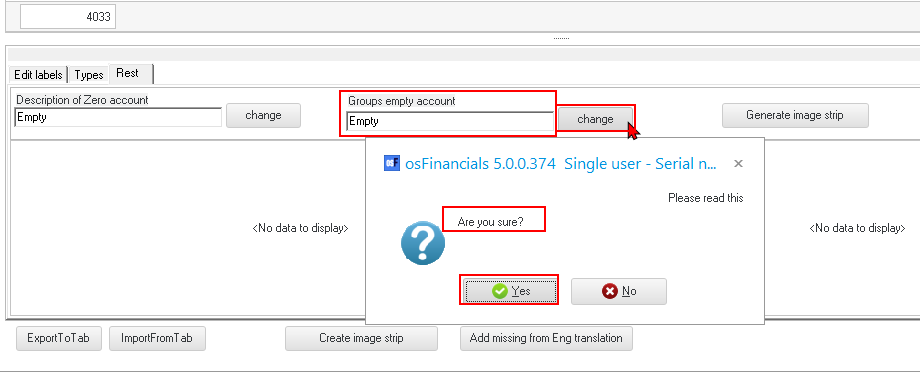
2.Click change button and click Yes.
3.Reopen the Set of Books. The changes to “Empty” is reflected in Reporting groups.
Bin/Tutorials updated in Install – Books / Publications
Set all tutorials to 1 March 2021
Included *.txf files in the Tutorial folders Exported-Posted-batches-import-txf since the Delimited file import starst at line 2 in a batch.
TurboCASH4 (838) – 2021 Publications
The following Set of Books based on this tutorial, are installed in the “…\Bin
Accounting Made Easy \Tutorials\EN-TUTORIALS\” folder:
•HANDYMAN (No transactions)
•HANDYMAN-A (Unposted)
•HANDYMAN-B (Posted)
Supporting folders
Exported-Posted-batches-import-txf – Exported batch transactions may be imported into a batch using the “Posted batches import” option (F9:Process icon) on batches.